
 Image 1 of 1
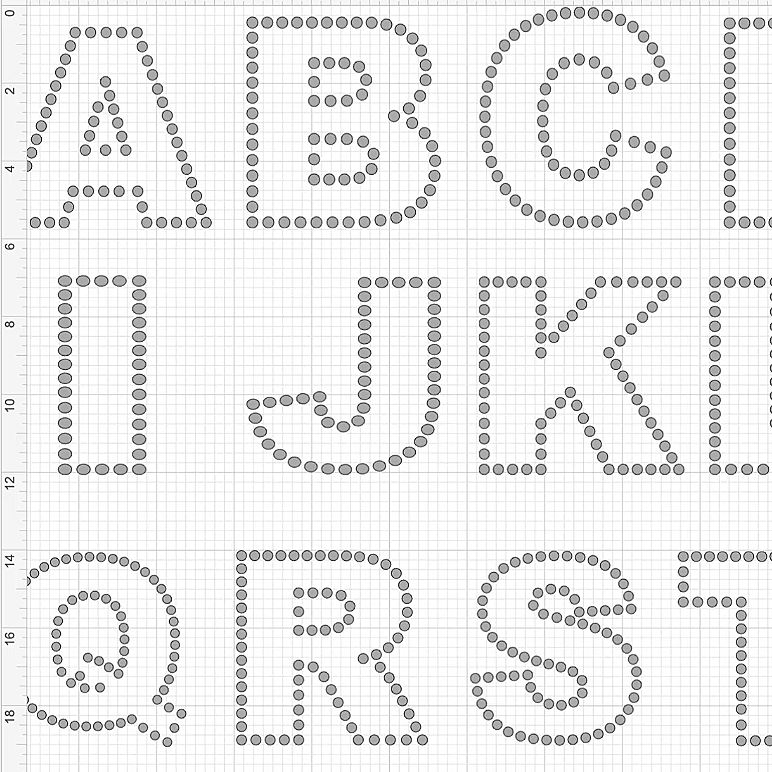
Create custom rhinestone names, words, and designs with these large SS12 Rhinestone Outline Letters!
This download includes letters J–R, designed for SS12 hotfix rhinestones. Use them to personalize shirts, sweatshirts, jackets, tote bags, team apparel, and more.
This is Part 2 of the SS12 Rhinestone Outline Alphabet collection. Download the A–I and S–Z sets to complete your alphabet.
1 SVG file featuring letters J–R
Large outline letters designed for SS12 hotfix rhinestones
Compatible with Cricut Design Space and other SVG-compatible cutting software
When you first upload the SVG into Cricut Design Space, the design will appear very large. This is normal!
Upload the SVG file into Cricut Design Space.
Resize each letter to 5 inches in height before cutting. Proper sizing is essential to ensure the holes fit SS12 rhinestones.
Save your resized project in Cricut Design Space so you don't have to resize the letters again.
Cut the letters you need using Magic Flock or similar rhinestone template material.
Brush your SS12 rhinestones into the templates, apply rhinestone transfer tape, and heat press your design onto your garment.
Once you've cut your letters using Magic Flock, save your templates! They can be reused for future projects, so you don't have to cut the same letters every time you create a new design.
Cricut or compatible cutting machine
Magic Flock or rhinestone template material
SS12 hotfix rhinestones
Rhinestone transfer tape
Heat press
Please Note: This is a digital SVG download. No physical products, rhinestones, or materials are included.
Happy creating!
Create custom rhinestone names, words, and designs with these large SS12 Rhinestone Outline Letters!
This download includes letters J–R, designed for SS12 hotfix rhinestones. Use them to personalize shirts, sweatshirts, jackets, tote bags, team apparel, and more.
This is Part 2 of the SS12 Rhinestone Outline Alphabet collection. Download the A–I and S–Z sets to complete your alphabet.
1 SVG file featuring letters J–R
Large outline letters designed for SS12 hotfix rhinestones
Compatible with Cricut Design Space and other SVG-compatible cutting software
When you first upload the SVG into Cricut Design Space, the design will appear very large. This is normal!
Upload the SVG file into Cricut Design Space.
Resize each letter to 5 inches in height before cutting. Proper sizing is essential to ensure the holes fit SS12 rhinestones.
Save your resized project in Cricut Design Space so you don't have to resize the letters again.
Cut the letters you need using Magic Flock or similar rhinestone template material.
Brush your SS12 rhinestones into the templates, apply rhinestone transfer tape, and heat press your design onto your garment.
Once you've cut your letters using Magic Flock, save your templates! They can be reused for future projects, so you don't have to cut the same letters every time you create a new design.
Cricut or compatible cutting machine
Magic Flock or rhinestone template material
SS12 hotfix rhinestones
Rhinestone transfer tape
Heat press
Please Note: This is a digital SVG download. No physical products, rhinestones, or materials are included.
Happy creating!